
Chandler Park: a 400+ office campus on UniFi
UniFi NetworkUniFi Wi-FiUniFi ProtectAI LPRUniFi ConnectBuilding BridgeDevice Bridge Pro
Chandler Park is a multi-tenant campus on Euclid Avenue in Cleveland: more than 400 offices across several buildings, plus salons, light-industrial tenants, a warehouse, loading docks, parking and a gated entrance. Tenants, their customers and building staff all depend on one network, so when something goes down, a lot of people notice at once.
Flare IT Solutions installed every piece of it: the gateway, fiber core, switches, access points, building bridges, cameras and signage. We still run it day to day, handle changes and expansions, and keep the Wi-Fi, switching and cameras healthy across every building.
The site
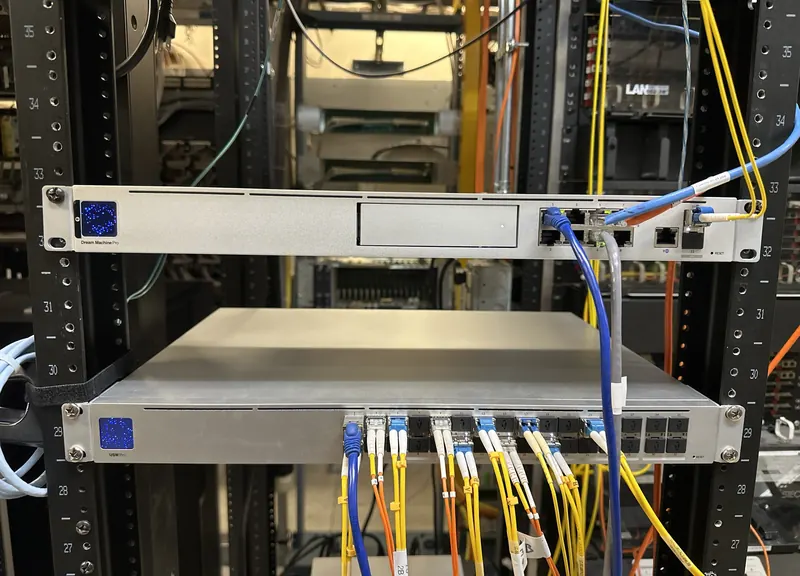
- Several buildings, one system. Buildings A through D, the Engine House, a warehouse and the outdoor areas all run from a single UniFi Network application on a Dream Machine Pro.
- Fiber backbone. A USW Pro Aggregation switch in the fiber room is the core, with 10 GbE uplinks to the gateway and several floor switches.
- A switch closet on every floor. Eight 48-port PoE switches plus smaller 24-, 16- and 8-port PoE switches power the access points and cameras over the same cable.
- Wireless links where cable can't go. A 60 GHz UniFi Building Bridge links two buildings without trenching fiber, and a UniFi Device Bridge Pro carries the network out to the north gate, where a USW Flex powers the gate cameras.
Wi-Fi for hundreds of tenants
Forty-four UniFi access points cover the common areas on every floor, individual tenant suites, maintenance areas, the loading docks and the outbuildings. In-wall access points serve suites where a ceiling mount doesn't make sense, and a U7 Outdoor covers the dock area. At peak the system carries around 600 devices at once.
We upgrade in phases rather than all at once. Older AC Pro access points are being replaced with Wi-Fi 7 U7 Pros where demand is highest, and new 48-port PoE switches have gone into the floors that needed more ports and 10 GbE uplinks.
Cameras, plate readers and deterrence
UniFi Protect runs 18 UniFi cameras across the campus. AI LPR cameras read license plates at the north and south gates, AI Pro cameras cover the other gates and the loading docks, and G6, G5 and G4 bullets, turrets and domes watch building entrances, hallways, salons and docks. Five third-party Reolink cameras are also adopted into Protect over ONVIF, so all video is reviewed in one place.
At the front entrance, an AI Horn Speaker and a PoE siren add audible deterrence, and a UniFi Viewport drives a live-view monitor without a PC. Dedicated PoE switches handle camera runs at the north gate and in the industrial spaces, and the Device Bridge Pro carries the north gate cameras wirelessly. One login covers Wi-Fi, switching and video.
Digital signage on the same network
TVs at the elevator lobbies on each floor run UniFi Connect through UC Cast players, showing building announcements and tenant ads. Content is managed from the same UniFi console as the network and cameras, so updating every screen in the building takes one change instead of a walk to each TV.
Tools we built on top of UniFi
We built building management a private, login-protected dashboard that pulls live device and client status from UniFi, so they can see the network without opening the controller. We also generate branded bandwidth reports straight from controller data.
What it shows
The same habits that keep a campus of more than 100 UniFi devices running are what we bring to a single office or home: plan it properly, label everything (every switch and access point here is named by building, floor and closet), upgrade in stages, and document it so the system is never a mystery.
Hardware on site
| Role | UniFi model | Qty |
|---|---|---|
| Network | ||
| Gateway | UniFi Dream Machine Pro | 1 |
| Fiber core | USW Pro Aggregation | 1 |
| 48-port PoE switches | US 48 PoE 500W, USW Pro 48 PoE, US 48 PoE | 8 |
| 24-port PoE switches | USW Pro 24 PoE, US 24 PoE | 2 |
| 16-port PoE switches | USW 16 PoE, USW Lite 16 PoE | 4 |
| 8-port PoE switches | US 8 PoE 150W, US 8 60W, USW Lite 8 PoE | 7 |
| Compact switches | USW Flex (rooftop, outdoor, gate, warehouse) | 5 |
| Ceiling access points | UAP AC Pro, UAP AC Lite, U7 Pro | 40 |
| In-wall access points | UAP In-Wall, UAP AC In-Wall | 3 |
| Outdoor access point | U7 Outdoor (loading dock) | 1 |
| Wireless building link | UniFi Building Bridge (60 GHz) | 2 |
| Wireless device link | UniFi Device Bridge Pro (north gate) | 1 |
| Protect | ||
| License plate cameras | AI LPR (north and south gates) | 2 |
| AI cameras | AI Pro (gates, loading docks) | 3 |
| Bullet cameras | G6 Bullet, G5 Bullet, G4 Bullet | 6 |
| Turret & dome cameras | G6 Turret, G5 Turret Ultra, G5 Dome Ultra | 6 |
| Compact camera | G3 Flex | 1 |
| Audio deterrence | AI Horn Speaker, Siren PoE | 2 |
| Live-view display | UniFi Viewport | 1 |
| Connect | ||
| Signage players | UniFi Connect UC Cast, UC Cast Lite | 5 |
| Total UniFi devices | 101 | |
Counts from the site's UniFi Network, Protect and Connect applications, October 5, 2026. Third-party cameras adopted into Protect are not included in the total.